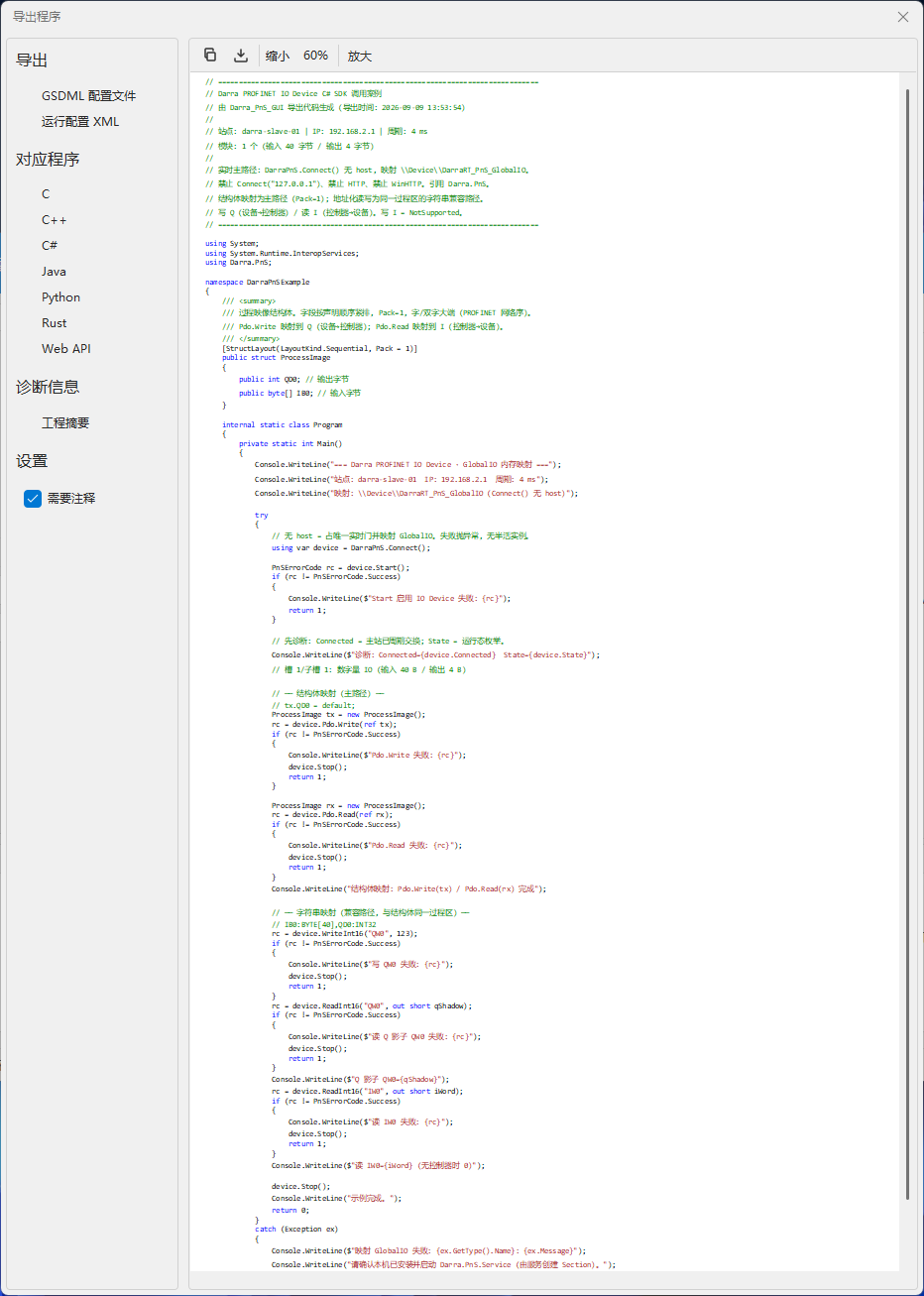
Continue SDK from ...
We’ve already tested this in the configuration tool and exported the code. You can find the SDK in the installation directory C:\DARRA\Profinet_Slave\SDK\, or install it from a public repository (NuGet for C#, PyPI for Python, Maven Central for Java, and crates.io for Rust). For C#, simply write using Darra.PnS;.
Minimum Cycle
Set the hostname and network adapter in the configuration tool. On the application side: new → Start → Map onceProcess data (structures are mapped to the process image; source variables become fields) → Stop.
The cycle switching is performed automatically; there is no need to write your own loop, and any thread can use it simultaneously. Read / Write This type isSnapshot(The copied instances do not change on their own); the mapping entry points are the entry points with InputsMapping the OutputsMapping same name in each language (read-only on the I side, writable on the Q side).
using System.Runtime.InteropServices;
using Darra.PnS;

[StructLayout(LayoutKind.Sequential, Pack = 1)]
struct FromPlc     // I: Controller → Device
{
  public byte Present;
  public short Recipe;   // Online IO Controller Endpoint: Simply align it with the upper end; retrieve the value using `Read(ref rx)`
}

[StructLayout(LayoutKind.Sequential, Pack = 1)]
struct ToPlc      // Q: Equipment → Controller
{
  public byte Ready;
  public byte Busy;
}

using (var device = new DarraPnS())
{
  device.Start();

  // Map once
  ref readonly var inp = ref device.ProcessData.InputsMapping<FromPlc>();
  ref ToPlc outp = ref device.ProcessData.OutputsMapping<ToPlc>();

  while (running)
  {
    if (!device.Connected)
      continue;

    byte present = inp.Present;  // Read I: Changes on Its Own After Bus Refresh
    outp.Ready = 1;              // Q: Write the process image directly
  }

  device.Stop();
}
Multi-byte fields use PROFINET network big-endian (wire) byte order: reading them directly as host short / int reverses the bytes; for host-order values use Read / Write (big-endian encode/decode).
- C++
- C
- Python
- Java
- Rust
#include "pns.hpp"
using namespace darra::pns;

#pragma pack(push, 1)
struct FromPlc     // I: Controller → Device
{
  uint8_t Present;
  uint8_t Trigger;
  int16_t Recipe;
};

struct ToPlc      // Q: Equipment → Controller
{
  uint8_t Ready;
  uint8_t Busy;
  uint8_t Ok;
  uint8_t Ng;
};
#pragma pack(pop)

PnSService device;
device.Start();

// Map once
const FromPlc& inp = device.ProcessData().InputsMapping<FromPlc>();
ToPlc& outp = device.ProcessData().OutputsMapping<ToPlc>();

while (running)
{
  if (!device.Connected())
    continue;

  uint8_t present = inp.Present;  // Read I: Changes on Its Own After Bus Refresh
  outp.Ready = 1;                 // Q: Write the process image directly
}

device.Stop();
#include "pns.h"

#pragma pack(push, 1)
typedef struct {          /* I: Controller → Device */
    uint8_t Present;
    uint8_t Trigger;
} from_plc_t;

typedef struct {          /* Q: Equipment → Controller */
    uint8_t Ready;
    uint8_t Busy;
    uint8_t Ok;
    uint8_t Ng;
} to_plc_t;
#pragma pack(pop)

pns_service_handle_t session = NULL;
PnSServiceConnectRealtime(&session);
PnSServiceStart(session);

/* Map once */
const uint8_t *i = NULL;                  /* I Read-Only */
volatile uint8_t *q = NULL;               /* Q: Writable */
size_t ni = 0, nq = 0;
if (PnSProcessDataInputsMappingRO(session, &i, &ni) != PNS_OK ||
    PnSProcessDataOutputsMapping(session, &q, &nq) != PNS_OK ||
    i == NULL || q == NULL ||             /* The view is empty when the operation fails */
    ni < sizeof(from_plc_t) || nq < sizeof(to_plc_t))
{
    /* Process image is not available */
}

const from_plc_t *inp = (const from_plc_t *)i;
to_plc_t *outp = (to_plc_t *)q;

while (running)
{
    if (!PnSServiceIsConnected(session))
        continue;

    uint8_t present = inp->Present;  /* Read I: Changes on Its Own After Bus Refresh */
    outp->Ready = 1;                 /* Q: Write the process image directly */
}

PnSServiceStop(session);
PnSServiceClose(session);
import ctypes
from darra_pns import PnSService

class FromPlc(ctypes.BigEndianStructure):   # I: Controller → Device
    _pack_ = 1
    _fields_ = [("present", ctypes.c_uint8),
                ("recipe", ctypes.c_int16)]

class ToPlc(ctypes.BigEndianStructure):     # Q: Equipment → Controller
    _pack_ = 1
    _fields_ = [("ready", ctypes.c_uint8),
                ("busy", ctypes.c_uint8)]

with PnSService() as device:
    device.start()

    # Map once
    inp = device.process_data.inputs_mapping(FromPlc)
    outp = device.process_data.outputs_mapping(ToPlc)

    while running:
        if not device.connected:
            continue
        present = inp.present   # Read I: Changes on Its Own After Bus Refresh
        outp.ready = 1          # Q: Impression of the straight-run process

    device.stop()
Snapshots are device.read_struct("Hi") / device.write_struct("Bf", 1, 1.5) and device.process_data.read_struct / write_struct — copied instances do not change on their own. Address-based read/write operations are path-compatible:
device.write_bool("Q0.0", True)
from_plc = device.read_bool("I0.0")
import com.darra.pns.service.PnSService;
import com.sun.jna.Structure;
import com.sun.jna.Structure.FieldOrder;

@FieldOrder({"present", "recipe"})
class FromPlc extends Structure {   // I: Controller → Device
    public byte present;
    public short recipe;
    public FromPlc() { super(ALIGN_NONE); }
}

@FieldOrder({"ready", "busy"})
class ToPlc extends Structure {     // Q: Equipment → Controller
    public byte ready;
    public byte busy;
    public ToPlc() { super(ALIGN_NONE); }
}

try (PnSService device = new PnSService()) {
    device.start();

    // Map once
    FromPlc inp = device.processData().inputsMapping(FromPlc.class);
    ToPlc outp = device.processData().outputsMapping(ToPlc.class);

    while (running) {
        if (!device.connected())
            continue;
        inp.read();                  // Process Image → Managed Cache
        byte present = inp.present;  // Read I: Changes on Its Own After Bus Refresh
        outp.ready = 1;
        outp.write();                // Write Q: Cached in memory → Process image
    }

    device.stop();
}
use darra_pns::{PnSService, ServiceResult};

#[repr(C, packed)]
struct FromPlc { present: u8, recipe: i16 }   // I: Controller → Device
#[repr(C, packed)]
struct ToPlc { ready: u8, busy: u8 }          // Q: Equipment → Controller

fn main() -> ServiceResult<()> {
    let device = PnSService::new();
    device.start()?;

    // Map once
    let inp = unsafe { device.process_data().inputs_mapping::<FromPlc>()? };
    let outp = unsafe { device.process_data().outputs_mapping::<ToPlc>()? };

    while running {
        if !device.connected() {
            continue;
        }
        let present = inp.present;  // Read I: Changes on Its Own After Bus Refresh
        outp.ready = 1;             // Q: Write the process image directly
        let _ = present;
    }

    device.stop()?;
    Ok(())
}
Address-based read/write operations (Q0.0 / I0.0) are path-compatible.
Click "Export" in the top toolbar of the configuration tool to generate examples in various languages.